I Built a 51 Component shadcn Registry for Console UIs
Table of Contents
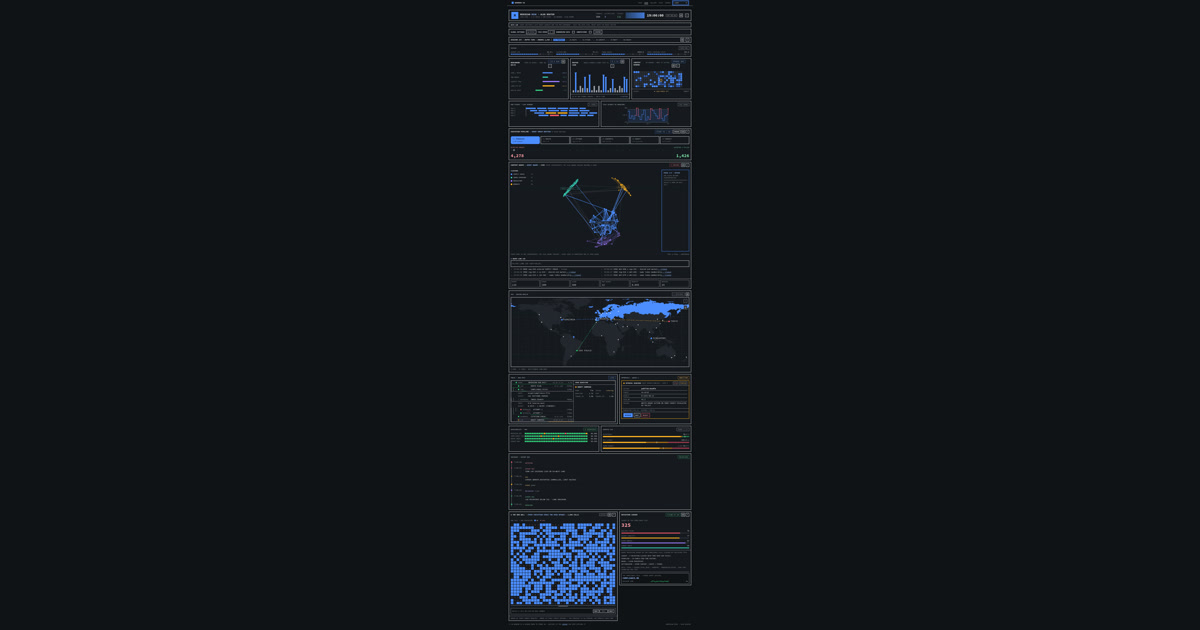
Design systems are promises. A registry is how you keep them without making everyone wait for you.
Every internal tool I have built ends up as a dashboard. Agent runs, model benchmarks, pipeline health, cost tracking. Same panels every time: a stat row, a sparkline, a heatmap, a ledger, a log list, a graph. I rebuilt them by hand for the third project in a row and decided to stop.
This post is the story of Warren UI, a 51 item component registry for dense console interfaces. It is live, it is MIT licensed, and it is the first thing I open when a new dashboard starts.
Why a registry and not a package
I considered the classic route: publish a compiled npm package with styled components and call it a library. It has one flaw for my use case. The moment someone needs a variant I did not anticipate, they either fork the package or wait for me. Both are bad.
The shadcn model solves this differently. Components are source files distributed as a registry. You install them into your own project and you own the code. No version lock, no theme fighting, no abstraction layer between the component and your Tailwind setup. npx shadcn@latest add https://warren.eduard3v.com/r/panel.json and the panel is in your tree, editable like any file you wrote yourself.
I built on that model because it matches how I actually work. I trust copy paste with a contract more than I trust a black box dependency.
The numbers
The registry ships 48 components plus three foundation items: the token layer, a class merge helper, and a shared tone type. Everything else in the namespace depends on those three.
The build ran through five expansion waves. Each wave started with research: four parallel agents produced 24 candidate components, and I ranked them by what a console actually needs. Charts and data displays won over decorative flourishes. The marquee pieces are the world-map (a dot matrix of the planet generated from Natural Earth data, about 3.9 thousand cells across 152 countries), the heatmap, the graph, the ledger, the approval-gate, and the agent-trace timeline.
Quality is enforced by gates, not vibes. The suite runs 821 tests in jsdom. A smoke gate builds the registry, installs every item into a throwaway consumer app through the real shadcn CLI, and compiles that app. If the install path breaks, nothing ships. The docs are a static export that has to build clean too.
What was actually hard
Density is the design constraint, and it fights accessibility. A run wall with hundreds of cells cannot afford a real interactive element per cell. The solution is one summary role with an aria label, cells hidden from the tree, and a single focusable inspector. It reads as one instrument instead of a thousand buttons.
Performance was the second fight. The world map is a giant SVG that renders again on every tick of the live demo. Naive rendering blew the test timeout. The fix was memoizing the static land grid and keeping parent side data churn low. The rule I learned: in a tick driven UI, the expensive child renders only what changed, and the parent stops changing everything.
The third fight was the design rules themselves. Radius zero. Numerals in monospace. Labels in caps, small, wide tracked. No shadows, no gradients. Signal color means state, never decoration. Those rules are written into a design spec and treated as acceptance criteria. Every polish pass had to verify computed styles in the browser, not eyeball screenshots, because the difference between a 10 pixel radius and a zero radius is exactly what breaks the aesthetic.
The honest tradeoffs
The registry is not a beginner library. It assumes you want density, that you read a design spec, and that you like your dashboards to look like mission control. If you want soft cards and rounded corners, this is the wrong tool and I will not argue with you.
Testing is thorough for interaction paths but light on visual regression. A pixel diff tool is the obvious next investment, and I have not shipped it yet.
The shadcn model also means breaking changes are yours to manage. When I move a component, your copy does not move with it. That is the price of source ownership and I think it is worth paying, but it is a real cost.
What I would do differently
I would have written the design rules before the first component, not after the third wave. The spec emerged from the critique loop and retrofitting it cost a full polish round.
I would also have built the demo harness earlier. The Meridian Desk demo, a live mission console with deterministic fixtures and editable data, caught more real bugs than the test suite did. It is the single best investment in the project. There is also a playable Risk style demo on the site now, which started as a joke and became the best integration test I have.
Try it
The site is at warren.eduard3v.com. The gallery shows every component in one view. The demo is live and ticking. The docs cover installation and every prop.
Install one panel into a project you own and see if the density works for you. If it does, the rest of the 51 are one command away. The source is on GitHub, and issues are welcome. I read them.